|
|
| (One intermediate revision by one user not shown) |
| Line 3: |
Line 3: |
| | | style="padding:30px 20px; text-align:left; vertical-align:middle;" | | | | style="padding:30px 20px; text-align:left; vertical-align:middle;" | |
| | <h1 style="margin:0; font-size:36px; font-weight: 800; line-height: 1.2;"> | | <h1 style="margin:0; font-size:36px; font-weight: 800; line-height: 1.2;"> |
| − | <span style="color:#333;">Taptica - AppsFlyer</span> <span style="color:#E94E24;">Integration</span> | + | <span style="color:#333;">Taptica - AppsFlyer</span> <span style="color:#E94E24;">Integration Guide</span> |
| | </h1> | | </h1> |
| | |} | | |} |
| | | | |
| − | <div style="max-width: 1200px; margin: 0 left; color: #333; font-size: 15px; text-align: left; direction: ltr; line-height: 1.9; font-family: 'Segoe UI', sans-serif; letter-spacing: 0.2px;"> | + | <div style="max-width: 1200px; margin: 0 left; text-align: left; direction: ltr; font-family: 'Segoe UI', sans-serif;"> |
| | | | |
| − | Follow this 5-step checklist to correctly set up Taptica's partner connection with your app in AppsFlyer:
| + | <!-- PAGE 1 --> |
| − | <br><br> | + | <div style="text-align: center; margin-bottom: 25px;"> |
| | + | [[File:AFtap1.jpg|1050px|center|link=]] |
| | + | </div> |
| | | | |
| − | <div style="background: #fff; padding: 15px 20px; border: 1px solid #eee; border-left: 4px solid #E94E24; border-radius: 4px; margin-bottom: 30px;"> | + | <!-- PAGE 2 --> |
| − | 🔗 '''Direct Marketplace Link:''' [https://hq1.appsflyer.com/discovery/about/taptica_int Click here to go directly to Taptica's integration page on AppsFlyer].
| + | <div style="text-align: center; margin-bottom: 25px;"> |
| | + | [[File:AFtap2.jpg|1050px|center|link=]] |
| | </div> | | </div> |
| | | | |
| − | <div style="margin-bottom: 25px; background: #fafafa; padding: 20px; border: 1px solid #eee; border-radius: 4px;"> | + | <!-- PAGE 3 --> |
| − | <span style="font-size: 18px; font-weight: bold; color: #E94E24;">Step 1: Partner Integrations Marketplace</span> [cite: 6] | + | <div style="text-align: center; margin-bottom: 25px;"> |
| − | <br><br>
| + | [[File:AFtap3.jpg|1050px|center|link=]] |
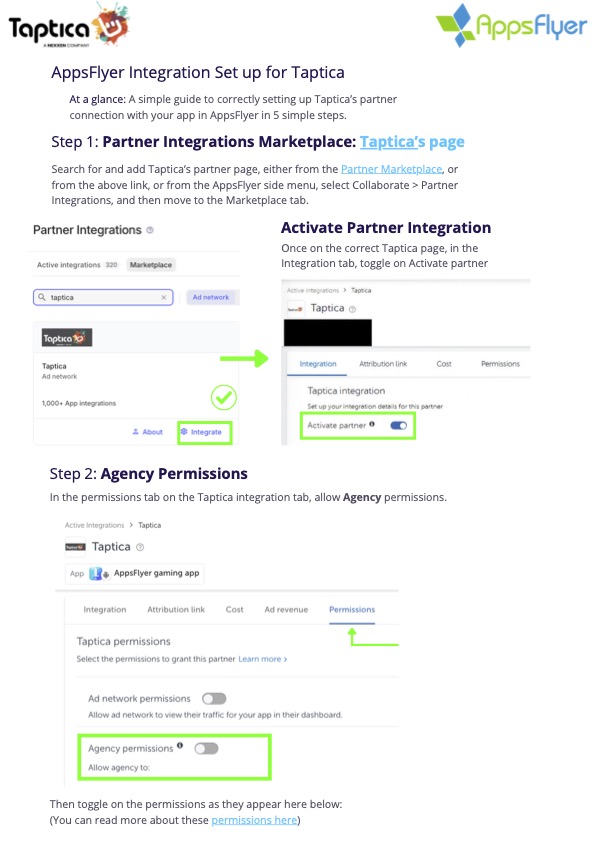
| − | Log in to AppsFlyer, click the direct link above, or use the side menu to go to '''Collaborate''' > '''Partner Integrations''' and select the '''Marketplace''' tab[cite: 7]. Search for '''Taptica''' and click '''Integrate'''[cite: 7, 10, 19]. Once on Taptica's setup page, inside the ''Integration'' tab, toggle on '''Activate partner'''[cite: 12].
| + | |
| | </div> | | </div> |
| | | | |
| − | <div style="margin-bottom: 25px; background: #fafafa; padding: 20px; border: 1px solid #eee; border-radius: 4px;"> | + | <!-- PAGE 4 --> |
| − | <span style="font-size: 18px; font-weight: bold; color: #E94E24;">Step 2: Agency Permissions Configuration</span> [cite: 27]
| + | <div style="text-align: center; margin-bottom: 25px;"> |
| − | <br><br> | + | [[File:AFtap4.jpg|1050px|center|link=]] |
| − | Switch over to the '''Permissions''' tab on the Taptica integration panel[cite: 28]. Toggle on '''Agency permissions''' and make sure the following specific settings are enabled: [cite: 28, 40, 42]
| + | |
| − | <ul style="margin-top: 10px; padding-left: 20px;">
| + | |
| − | <li style="margin-bottom: 5px;">Change the Advanced Privacy setting [cite: 47]</li>
| + | |
| − | <li style="margin-bottom: 5px;">Access retention and cohort reports [cite: 48]</li>
| + | |
| − | <li style="margin-bottom: 5px;">Access aggregate organic data [cite: 49]</li>
| + | |
| − | <li style="margin-bottom: 5px;">View validation rules [cite: 50]</li>
| + | |
| − | <li style="margin-bottom: 5px;"><span style="color:#999;">Add validation rules</span> (Leave this turned '''OFF''') [cite: 51]</li>
| + | |
| − | <li style="margin-bottom: 5px;">Access raw data reports [cite: 52]</li>
| + | |
| − | <li style="margin-bottom: 5px;">Access Protect360 dashboard & raw data [cite: 53]</li>
| + | |
| − | </ul>
| + | |
| | </div> | | </div> |
| | | | |
| − | <div style="margin-bottom: 25px; background: #fafafa; padding: 20px; border: 1px solid #eee; border-radius: 4px;"> | + | <!-- PAGE 5 --> |
| − | <span style="font-size: 18px; font-weight: bold; color: #E94E24;">Step 3: Configure In-App Event Postbacks</span> [cite: 55]
| + | <div style="text-align: center; margin-bottom: 25px;"> |
| − | <br><br> | + | [[File:AFtap5.jpg|1050px|center|link=]] |
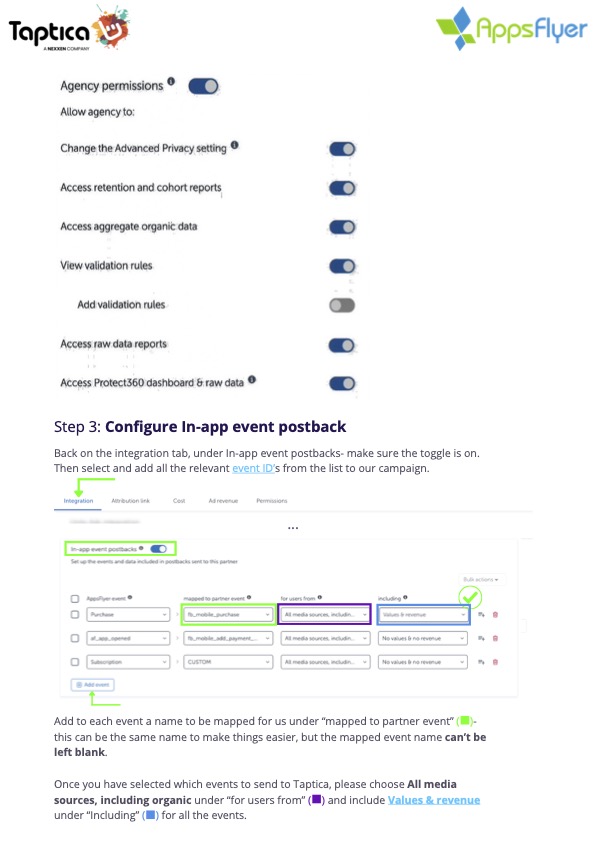
| − | Go back to the '''Integration''' tab and verify that the '''In-app event postbacks''' toggle is turned '''ON'''[cite: 56].
| + | |
| − | <br>
| + | |
| − | Click '''Add event''' to include all the relevant event IDs for the campaign, and fill them out as follows: [cite: 57, 79]
| + | |
| − | <ul style="margin-top: 10px; padding-left: 20px; list-style-type: circle;">
| + | |
| − | <li style="margin-bottom: 8px;">'''Mapped to partner event:''' Enter a name for each event (using the same name makes mapping easier, but it cannot be left blank)[cite: 83].</li>
| + | |
| − | <li style="margin-bottom: 8px;">'''For users from:''' Select ''All media sources, including organic''[cite: 84].</li>
| + | |
| − | <li style="margin-bottom: 8px;">'''Including:''' Choose ''Values & revenue'' for all added events[cite: 84].</li>
| + | |
| − | </ul>
| + | |
| | </div> | | </div> |
| | | | |
| − | <div style="margin-bottom: 25px; background: #fafafa; padding: 20px; border: 1px solid #eee; border-radius: 4px;"> | + | <!-- PAGE 6 --> |
| − | <span style="font-size: 18px; font-weight: bold; color: #E94E24;">Step 4: Main App Settings Check</span> [cite: 88] | + | <div style="text-align: center; margin-bottom: 25px;"> |
| − | <br><br>
| + | [[File:AFtap6.jpg|1050px|center|link=]] |
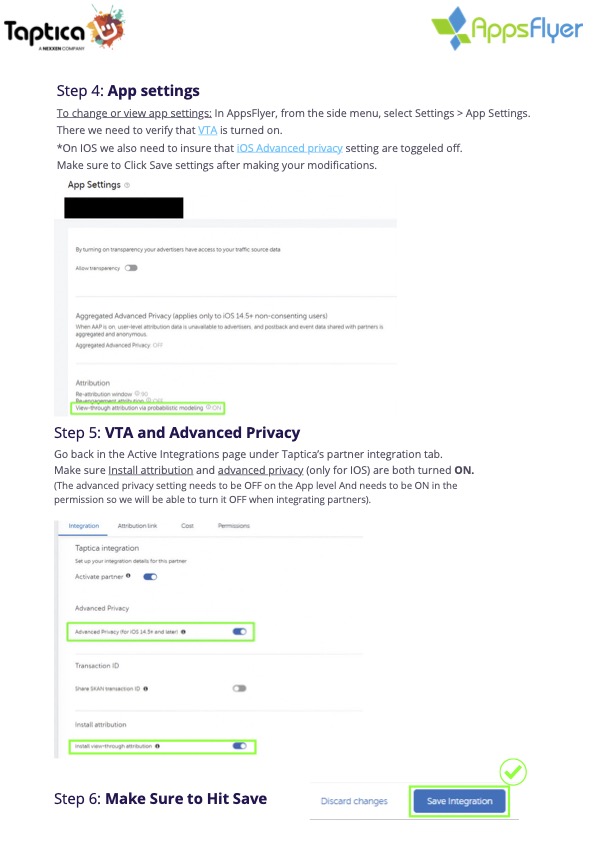
| − | From the main AppsFlyer side menu, select '''Settings''' > '''App Settings'''[cite: 89]. Scroll down and confirm that '''View-through attribution via probabilistic modeling (VTA)''' is turned '''ON'''[cite: 90, 104].
| + | |
| − | <br>
| + | |
| − | ''*Note for iOS: Make sure that Aggregated Advanced Privacy is toggled OFF at this app level (it should be managed inside the partner permissions instead)[cite: 91, 108].''
| + | |
| | </div> | | </div> |
| | | | |
| − | <div style="margin-bottom: 25px; background: #fafafa; padding: 20px; border: 1px solid #eee; border-radius: 4px;"> | + | <!-- PAGE 7 --> |
| − | <span style="font-size: 18px; font-weight: bold; color: #E94E24;">Step 5: Final Check & Save Integration</span> [cite: 105] | + | <div style="text-align: center; margin-bottom: 25px;"> |
| − | <br><br>
| + | [[File:AFtap7.jpg|1050px|center|link=]] |
| − | Navigate back to the Active Integrations setup page for Taptica[cite: 106]. Double-check that both '''Install attribution''' and '''Advanced Privacy''' (for iOS 14.5+) are properly set to '''ON'''[cite: 107].
| + | |
| − | <br><br>
| + | |
| − | ⚠️ '''CRITICAL FINAL STEP:''' Scroll down to the bottom of the screen and click the '''Save Integration''' button to activate everything[cite: 122, 124].
| + | |
| | </div> | | </div> |
| | | | |
| | <br> | | <br> |
| | + | <hr style="border: 0; border-top: 1px solid #eee;"> |
| | + | <br> |
| | + | |
| | 📍 [[MMP integration guide | 🔙 Back to MMP Integration Guides]] | | 📍 [[MMP integration guide | 🔙 Back to MMP Integration Guides]] |
| | | | |